Have you ever seen all the TVs at your local electronics store? Of course you have. They all look great. Well, they are placed under similar lights, pointed at similar angles, and most likely playing the same video. Sort of like picking a pair of shoes in the store. They may look great on your feet, but can you walk in them all day?
Well, your home is different. It has windows, couches, and viewing habits that all affect how your TV looks. The best budget TV is the one that performs well in your home, not under store lights.
In this article, we’ll explore the features that matter in your home and the ones that are nice to have. Those extras usually cost more. We’ll also show you how to read a spec sheet. Grab a coffee. This won’t take long.
What Makes the Best Budget TV Worth the Money?

When you buy a TV on the cheaper side, something usually has to give. Budget TVs often make compromises in HDR brightness, contrast, motion handling, image processing, and smart TV performance. The exact compromises depend on the model. So compare real test results instead of assuming every budget TV has the same limits. Your goal is to find the TV that works best in your room.
So, the first question you should ask yourself is where your TV will be spending the most time. If your TV is going to be spending lots of time in the living room, a TV with weak brightness will expose its flaws quickly. Conversely, if the TV lives in a dark basement, it may struggle with black levels.
| Room | Pay For First | Check, But Don’t Pay Extra | Skip |
| Bright living room | Strong SDR brightness, reflection handling | Dolby Vision support | 8K resolution |
| Dark media room | Contrast, black levels, good local dimming or OLED | Wide viewing angles | Marketing motion rate claims |
| Gaming den | Native 120 Hz, VRR, low input lag, compatible HDMI inputs | Built-in speakers | Unnecessary AI picture modes |
| Bedroom or secondary room | Good everyday picture quality and a responsive smart platform | 120 Hz refresh rate | Premium HDR branding without strong HDR performance |
Is the TV part of a bigger plan? Our guide to choosing the right home theater system shows where the screen fits in.
The Features That Matter on a Budget TV
Four features shape what you actually see on screen, so they deserve most of your budget. Each one ties back to a room in the table above.
Brightness, Local Dimming and HDR
Brightness is the first feature that shapes what you see on screen. It plays a big role in how convincing HDR content looks. A TV with limited HDR brightness may struggle to show intense highlights. A brighter model can make those details stand out more clearly. In a bright living room, strong SDR brightness also keeps the picture visible when sunlight or lamps hit the screen.
Local dimming lets an LED TV control different sections of its backlight independently. This can improve contrast by keeping dark areas darker while bright objects stand out. More dimming zones can help reduce blooming, the halo of light around bright objects. However, the processing that controls those zones matters just as much.
Mini LED backlights use smaller LEDs than conventional LED backlights. That lets manufacturers pack the backlight more densely, and many models get more local dimming zones. However, the number of zones and the quality of the dimming algorithm still vary by TV. Some reviews list the zone count, so check the exact screen size you plan to buy.
For brightness, look for independent measurements in both SDR and HDR. Also check how well the TV holds its brightness across different screen sizes. A high peak brightness number alone won’t tell you how bright the whole picture looks in normal viewing. Many TVs also advertise HDR10, HDR10+, or Dolby Vision. That only means the TV can accept those formats.
Native Refresh Rate
The native refresh rate of a TV is simply how often the screen can update in one second. Do not confuse this with the frame rate, which is the number of frames that your source is sending out. Most cheap TVs will have a refresh rate of either 60 Hz or 120 Hz.
A 60 Hz TV is enough for most shows, movies, and everyday streaming. A native 120 Hz panel is worth considering if you play compatible games at higher frame rates. It can also give you more motion handling flexibility for sports and other fast content.
If you regularly play games that support 120 fps, a native 120 Hz TV is a worthwhile upgrade. For most movies, streaming shows, and standard sports broadcasts, a 60 Hz panel usually does the job.
HDMI 2.1 Features for Gaming
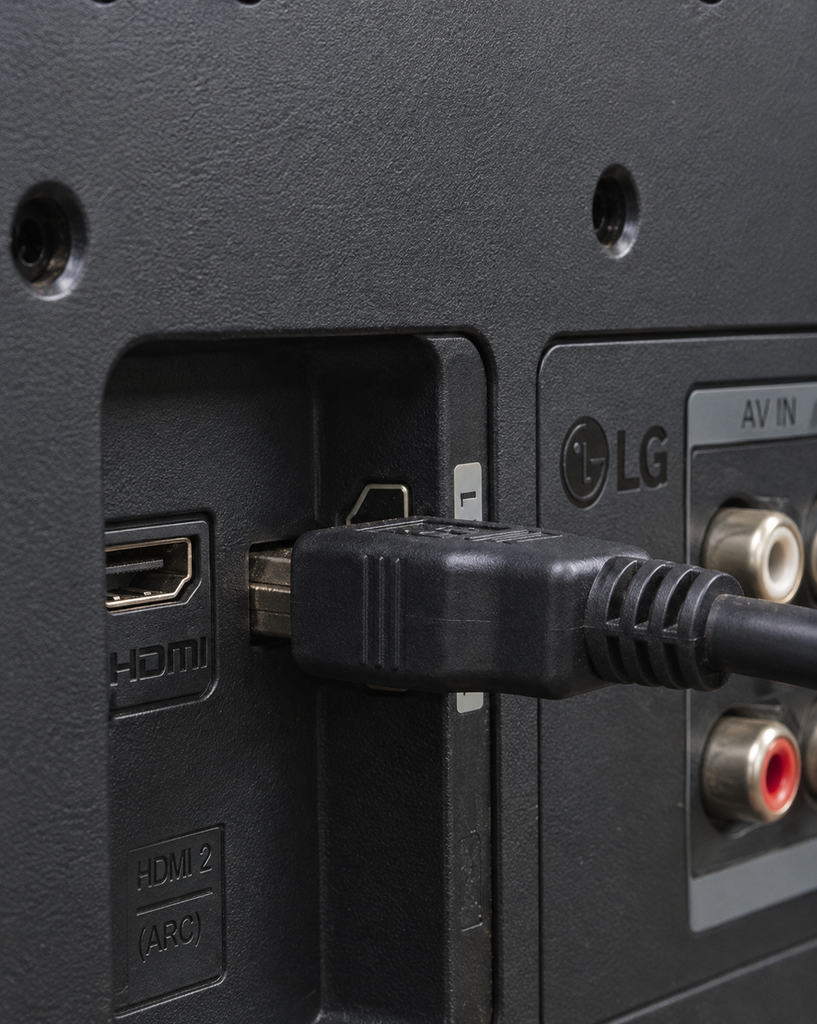
When gaming on a console or PC, there are three HDMI 2.1 features to know. The first is 4K at 120 Hz. This feature lets compatible games run at higher frames per second (FPS). The next is variable refresh rate (VRR). VRR lets your TV sync with your console’s frame rate, which helps reduce screen tearing. Finally, there’s Auto Low Latency Mode (ALLM). ALLM switches your TV to game mode when your console calls for it.
Here’s what may surprise you. Some TVs have only one or two HDMI inputs that support 4K at 120 Hz. The same goes for other high bandwidth gaming features. If one of those ports also handles eARC, you may have fewer connections left for gaming devices. So check the specs for each port before you buy, especially if you plan to connect several consoles and a soundbar. If you only stream, these HDMI 2.1 features may matter less to you. For gamers, our design guide has more tips on optimizing your home theater for gaming.
Panel Type and Viewing Angles
Sit at the edge of your couch, and your TV may suddenly look dull. This effect usually comes from the panel type. VA LCD panels generally offer higher native contrast and deeper blacks, which makes them attractive for dark room viewing. However, their picture quality can drop when you watch from wider angles. IPS type LCD panels generally offer better viewing angles and color consistency. The tradeoff is their lower native contrast, which can make blacks look gray in a dark room. Keep in mind that Mini LED describes the backlight, not the LCD panel type.
If you know where you’ll sit when you watch TV, pick your panel type based on that. For example, if you sit at one end of a large couch, viewing angles matter more to you. If you have a single recliner and want deep blacks, a VA or OLED panel could suit you better. OLED TVs offer excellent contrast, true black levels, and very wide viewing angles because each pixel produces its own light. They can cost more than budget LED models. However, some Mini LED TVs can get brighter, which matters most in bright rooms.
Which “Premium” TV Features Can You Skip?
Some premium features offer little benefit on a budget TV. Terms like Motion Rate and Clear Motion Index can confuse buyers because they describe processing, not the panel itself. Samsung’s Motion Rate is a marketing figure rather than the panel’s actual refresh rate. Under the common convention, Motion Rate 120 matches a native 60 Hz panel, and Motion Rate 240 matches 120 Hz. Other manufacturers use different motion processing labels. So always look for the native refresh rate on the spec sheet.
8K is another feature you can usually skip on a budget TV. Most streaming and disc content tops out at 4K resolution. So an 8K TV spends most of its time upscaling lower resolution content. Your money goes further on features like brightness and local dimming. Also, don’t pay extra only because a TV advertises AI picture modes or a powerful processor. What matters is how well the TV handles upscaling, motion, noise reduction, and HDR processing. Check independent reviews to see how the picture looks in real use. Then make sure you can adjust or turn off processing features you don’t like.
How Do You Read a Budget TV Spec Sheet?
Just like a menu in a restaurant, a TV box only tells you what is available. Ask yourself what each claim actually means in practice. Below are some of the most common claims and what they really mean.
| Box Claim | What It Tells You | Question to Ask |
| Motion Rate 240 | A marketing motion figure | What is the native refresh rate? |
| HDR or Dolby Vision | Supported HDR formats | How bright is it, and how good is its contrast? |
| 4 HDMI ports | Number of inputs | Which ports support 4K at 120 Hz, VRR, and eARC? |
| Game Mode | A low latency picture mode | Does it also support VRR and ALLM? |
| Dolby Atmos | Atmos related audio support | Does it decode, process, or pass through Atmos, and what speakers reproduce it? |
| Same model name | A product family | Does my exact screen size use the same panel and features? |
The final row often catches people out. Different models in the same family can have different panels, refresh rates or ports. A review of the 65-inch version may not describe the 50-inch one you plan to buy. Make sure you check the specs of your exact size and look for a review of that size if one exists.
Conclusion
See, that didn’t take long. Remember, a showroom shows every TV at its best. At home, your TV might sit in a living room with a west-facing window that floods it with light. It might live in a dark man cave with little light. Or it might sit in a bedroom set up for streaming and gaming.
Since you’re on a budget, spend your money on the features that make the biggest difference to your viewing. Prioritize picture quality, contrast, brightness, and the refresh rate you actually need. Skip the fancy buzzwords. You can always improve the sound and mounting setup separately.
If you would like some help designing your room around your new screen, why not book a free consultation with our team?
FAQ
Is a 55-Inch or 65-Inch Budget TV Better?
It all depends on how far away you are from it, how your room is set up, and what you like to watch. No single size fits everyone. A larger screen will also highlight any issues with the budget panel, so check the brightness and black levels of the sizes you are considering.
How Long Do Budget TVs Last?
The lifespan of a TV will depend on how much you use it, brightness settings, ventilation, and power quality. While most brands will not give a specific lifespan figure, looking at the warranty conditions will tell you how long you are covered.
Should I Buy an Extended Warranty on a Budget TV?
An extended warranty may be worth it if it adds meaningful coverage beyond the manufacturer’s warranty. Before you buy one, compare its price with the cost of replacing the TV. Then check which faults it covers, what it excludes, and how it handles repairs or replacements. It isn’t automatically worth the extra cost.